It is finally 2015 and we’ve all got big dreams and big goals for the
New Year. I love setting resolutions, but hate trying to keep to them.
My biggest problems are with staying fit and keeping organized. I start
off with a bang, but eventually lose momentum after a few months.
Whether you are fighting to shed that “winter coat” you gained during
the holidays, or are looking for a better way to get your life
organized, we’ve got a list of apps to help you start the New Year off
right.
Health & Fitness
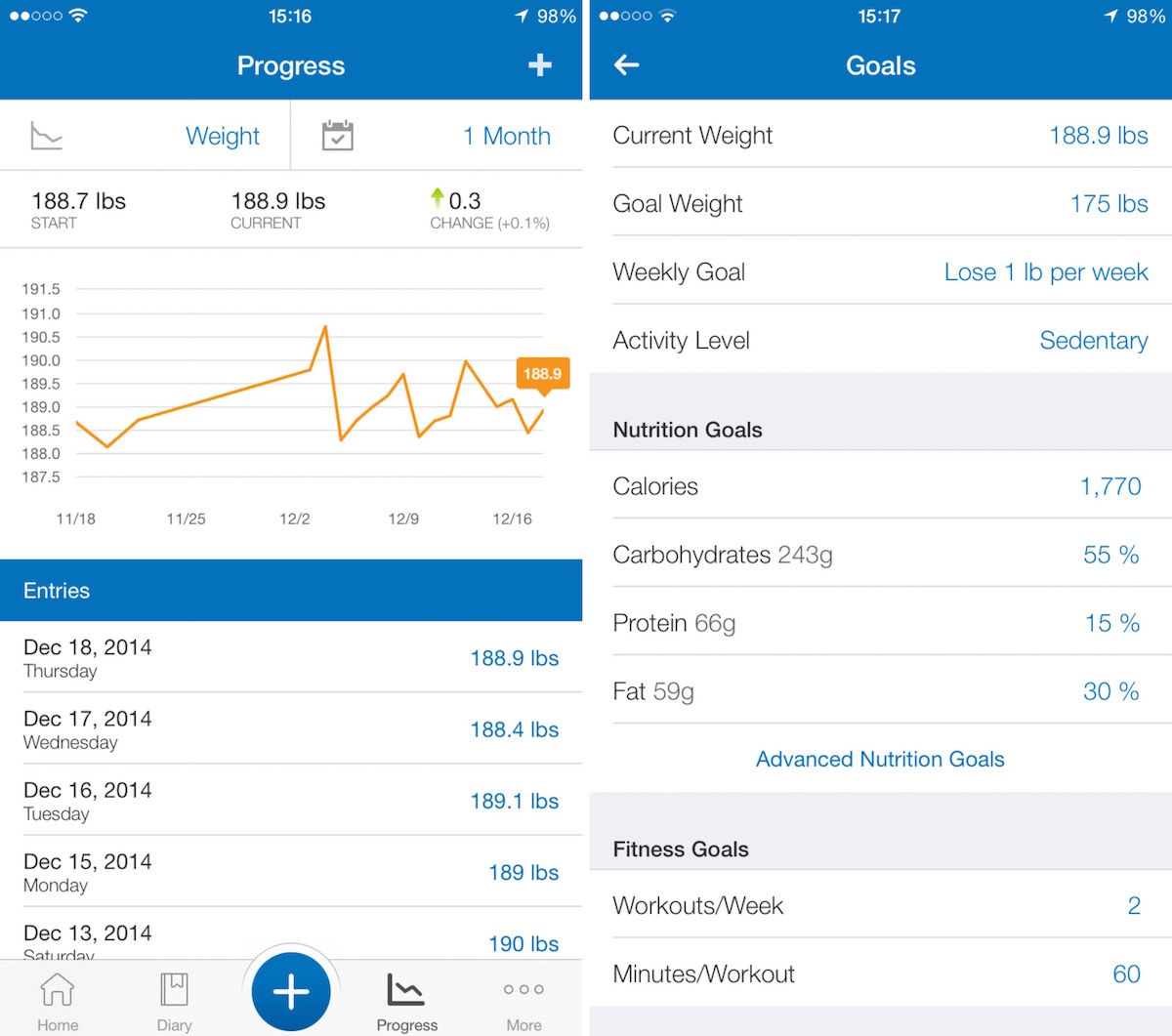
When it comes to keeping track of your daily health and fitness habits, nothing compares to MyFitnessPal.
You’ll be able to add your calorie intake, keep track of how much you
walk everyday and include workout sessions. Add your goal weight and,
based on your size and typical activity, you’ll find out how long it
will take you to reach that goal. Include a customized ingredient intake
goal to keep an eye on your diet. If you are eating too many carbs and
too little protein, you’ll know it.
This app is available for free.

Right after the New Year begins, I always feel like I’ve overloaded
with too much rich food, booze, and sugar. One easy way to feel better
after all this is to start running. If you’ve fallen off the exercise
wagon and are looking for a way to get motivated to start again, this app
will get you moving. The voice coach will keep you motivated while your
heart is pumping. Track your route using the in-app GPS and see just
how far you’ve gone. Integrate your run sessions with MyFitnessPal. If
you are just starting out, you can choose a training plan to get help
with daily fitness goals and weight loss plans.
This app is available for $4.99.
Exercise is only one part of getting healthy. The food you eat has a
major affect on your energy levels and for some people might even affect
their health. This app helps you keep track of what you consume every
day. The in-app scanner will even automatically add all nutritional
information if the item is already stored in the database. If you’ve got
a customized meal, you can add the nutritional content to help you get
detailed information on your diet. You can also add exercise statistics
from a large database, or customize your own information.
This app is available for free.
Sleeping is a major part of a healthy lifestyle and tends to be one
of those activities that get overlooked, especially for those with a
busy schedule. If you find yourself feeling tired and don’t know why,
use this app to track your sleep cycle and find out what is going wrong.
There are multiple types of alarm clocks to suit different needs, like
immediate or slow wake-up modes. The sleep aid helps you fall asleep.
The motion detector recognizes when the Sandman has come and will turn
off the audio track. Use the sleep notes to see how events like too much
coffee or stress affects your sleep cycle.
This app is available for $0.99.
Whenever I see celebrities looking fantastic right after having a
baby or into their twilight years, I envy their lifestyle. I could
probably stay in shape if I had a personal sushi chef and someone
kicking me out of bed to go for a jog every morning. Not everyone can
afford a personal trainer, but this app makes you feel like you can. It
features dozens of specialized workout sessions for all levels of
fitness. If you are just getting started with your New Year’s resolution
or are looking to drop those last five pounds, you’ll be guided to a
workout routine that is just right for you. After your workout is over,
you tell the app what was easy and what was hard and the next session
will adjust based on your feedback, just like a real personal trainer.
This app is available for free.
Productivity
When it comes to keeping track of your ideas, articles, and project progress, nothing says “productivity” the way Evernote does.
You can write original notes, grab copied content from the Internet,
and even save entire web pages. You can organize your notes into
specific categories and add tags for easy research. Make lists and check
off items as you complete them. Prepare agendas for upcoming meetings.
Share your notes with others for collaboration. You can save your travel
reservation and ticket information so you can easily find it all in one
place. The business card scanner will even import new contact
information by taking a picture of a card. You can also use Touch ID to
secure Evernote, so no one will get in without your knowledge.
This app is available for free.
Since my desktop has been giving me trouble, I’ve been spending more
and more time on my laptop. However, I really miss the screen space.
I’ve tried a few Wi-Fi connected second screens and found them to have
too much lag to make it worth my while. This app
connects directly to your Mac computer using the USB cable, so
information is send directly to your iOS device instead of over the air.
On my 2013 MacBook Pro and iPad Air, there is zero latency. I can even
watch YouTube videos while typing up app reviews. The app also gives you
control over the FPS rate and screen resolution for better performance.
This app is available for $14.99.
If you want to get serious about getting things done, this app will
take you to the next level. Create project lists with sub lists and
deadline schedules, make a to-do list for daily tasks, and have Siri add
information to your organizer for you. Under the project creation
section, you can prioritize items, track their progress, and set
deadlines. Add a location to your errand list and get reminders when you
are near somewhere important. Check the overview to see what your week
ahead looks like in terms of projects. You can also sync with OmniFocus for iPad and
Mac to keep your productivity on track.
This app is available for $19.99.
Contrast describes their app as “speed dial for everyday tasks,” and
that about sums up this amazingly useful program. Users set up a
particular formula, like “call mom” or “find a gas station” and add it
to their main page. Then, tap that app to activate the particular
action. It will automatically open and load to the parameters you’ve
specified. It is compatible with such apps as FaceTime, Safari,
Facebook, Google search, and more. You can automatically send photos to
group messages, scan items and search for their counterpart on Amazon,
and even create a new project list in OmniFocus. Plus, with IFTTT integration, you can also create recipes to perform even more tasks automatically.
This app is available for $2.99.
I’ve been using this app
to keep track of my daily work assignments for a long time now. It is
easy to set up and syncs across all of your iOS devices. You can create
lists and add to-do items to each one. Schedule due dates for tasks to
see what you must do each day. You can also check the weekly view to see
the work you’ve got ahead. Customize to-do items with notification
reminders, recurrences, subtasks, and more. Add notes to items to help
you stay on track and remember what the task is for. With the Pro
features, you can also collaborate with others in Wunderlist by sending
your tasks to others that use the list.
This app is available for free.



Comments
Post a Comment