Posts

Showing posts with the label iTunes

Samsung Galaxy S26- rumor has it.

Image
 It's still quite early in the Galaxy S26 rumor cycle, so there are plenty of things we don't know about the upcoming lineup. But we have started hearing some murmurs about what to expect, which will only increase as we get closer to 2026. One noteworthy rumor suggests Samsung may revert back to releasing three phones instead of four, as it did with the Galaxy S25 — but which three? Here's what we know about the Samsung Galaxy S26 so fa r. 📅 Launch & Naming Strategy Samsung is rumored to discontinue the base S26 and Plus models, replacing them with a three‑model lineup: Galaxy S26 Pro, S26 Edge, and S26 Ultra, based on firmware codenames M1, M2, and M3 . The Galaxy S26 series is expected to debut in January or February 2026, with a possible December 2025 pre-order push to align with holiday demand. 💰 Pricing Entry-level pricing is speculated to start around $799 / £799, though the shift to premium Pro and Edge models may result in a modest price hike ...
How to Redeem a Promo Code in the App Store

Image
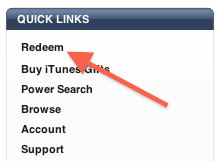
In this post, I will show you how to quickly and easily redeem an App Store app promo code, either from iTunes, or even better, directly from your iPhone… From iTunes: Step 1:  Launch iTunes and go to the iTunes Store. Step 2:  Make sure you are on the iTunes Store homepage, and look to the right, in the sidebar, you should see the following image. Step 3:  Click on “Redeem”, which should take you to this page: Step 4:  Enter the promo code in the text box, then hit “Redeem”. The app will start downloading to your library of apps. From the App Store App: Step 1:  From your iPhone, go to the App Store app. Step 2:  Navigate to the “Featured” section. Step 3:  Scroll all the way down, and tap the “Redeem” option. You should now see this screen: Step 4:  Enter the promo code in the text box, then hit “Redeem”. The app will download to your iPhone as if you had purchased it.

How To Create And Set Any Song As Custom iPhone Ringtone

Image
Here’s how to create and set any song file as custom iPhone ringtone using iTunes in a few simple steps. More details on how to do so can be found here. Even though we live in a world where so many of us use our phones with the silent switch always flicked to the  ‘ON’  position, there is still a time and a place for a nifty ringtone. Apple’s iPhone comes with some pretty cool ones already built in, but that means that all the good ones have already been used to death. What you need is a ringtone that’s a little bit unique. Creating custom ringtones for your iPhone isn’t too difficult. All you need is a bit of audio snipping skills – or sourcing, depending on the situation – iTunes and a USB cable to get the ball rolling. Here’s how you can do just that. Creating A Custom Ringtone Step 1: Launch iTunes, open your music library, and select the song or audio bit which you want to use as a custom ringtone. Step 2: Right-click on the song / audio bit, click on  ‘...

How to transfer your iTunes library to a new computer

Image
The best thing about getting a new computer is that, well, you’re getting a brand new computer. It’s exciting to have a shiny new toy to play with, making you wonder how you could have been using that old machine for so long. To me though, the major downside of getting a new computer is that you have to set it all up from scratch. I’m not going to lie; some of that is part of the fun, but it can also be stressful and time consuming. Take migrating your iTunes library to your new computer for example. There is nothing really fun in that, and if you have a large library, it could take hours. In this post, I will show you how to move your iTunes library to a new computer. Unfortunately I won’t be able to save you time or stress, but at least, you’ll have simple instructions on how to do transfer all your iTunes songs, albums, album covers, and playlists to a brand new computer. Before we get started, it must be noted that there are several ways you can migrate your o...

Fleksy Keyboard support GIF on iOS 8 goes free on app store for a week

Image
If you love using GIF images, given how expressive the content can be for messaging purposes on an iOS device, then you will definitely love this piece of news. The famous third-party Fleksy keyboard now comes integrated with Riffsy’s GIF Keyboard and the whole package is available for free as part of a promotion period. Since the release of iOS 8 last year, plenty of third-party keyboard apps have piled up in the App Store, and  Fleksy is easily one of the better ones out of the bunch. The app has always been a paid offering however, but users who had been looking to buy Fleksy for a while now can grab the app absolutely free, with the GIF Keyboard integrated as well. In a press release Fleksy says,  “GIF Keyboard will now come pre-configured, making Fleksy the only major keyboard combining typing, GIFs, and emoji all in one place. The integration brings GIF Keyboard’s millions of GIFs and exclusive content partnership...

Rules puzzle game @ $2.99 goes free on app store

Image
Those of you who enjoy app deals may be interested to know that  Rules!  has gone free for a limited time. Apple is currently offering promo codes for the popular brain-teasing puzzler, which typically costs $2.99, within its  Apple Store  app. For those who haven’t played it before, Rules! is a well-designed puzzle game that puts your memory and reflex skills to the test. Players are presented with a 16-card board, and asked to remove cards based on increasingly difficult guidelines. Apple describes the app: Rules! is a fiendishly trick puzzler that’ll test your memory and your reflexes. To clear each set of colorful tiles, you’ll need to follow specific rule in order before the click runs out. Rules! will work on your new Apple Watch too. And here are some screenshots: To grab your free copy, simply launch the  Apple Store app  (not to be confused with App Store), navigate to the ‘Stores’ tab an...

Flic app manage your iphone or ipad camera roll quickly with familiar gestures

Image
If you ever used  Tinder , then you are familiar with the swipe method of keeping what you want and discarding what you don’t. With Fli c ( iTunes link ), you can manage your camera roll those same fun and familiar swipe gestures — simply swipe left to trash and swipe right to keep. Previously a paid app, you can now download  Flic  for free (contains in-app purchases) in the App Store. Flic provides a snapshot of the image including a large thumbnail, the size of the photo, and the date the photo was taken. This way you can see how much space each photo is taking up on your phone. When you have completed your photo purge, the total amount of space cleared will appear at the top of the screen. But if you are free user like me, you may only delete 100 per day. That’s plenty for me, but some users may hit that barrier more often. While Camera Roll’s internal photo management system is adequate, Flic makes it fun to keep and discard ...

iTunes 12.1.2 -released for both windows and mac users

Image
iTunes 12.1.2 is available for both Windows, Mac users, and includes a number of changes that follow directly on from the recent, aforementioned software updates. For example, iOS users can now sync their photo libraries via the all-new Photos app – if you’re on OS X – which has displaced iPhoto and Aperture as Apple’s main image-sorting / editing application. Before now, iTunes supported the syncing of iPhoto libraries with iPhone, iPad and iPod touch devices, but since it is now defunct and Photos has taken over the space, iTunes 12.1.2 ensures that early adopters of the new app are good to go. Aside from the Photos tweaks, the change log also notes of  “several refinements to the Get Info window,”  which perhaps sounds a lot more significant than it is, while general stability has also been improved with iTunes 12.1.2. iTunes is often berated for its bloated nature, and while Apple has endeavored to improve the music / video / content app over the years, it’s st...

All Star Wars movies now available on iTunes

Image
Monday, The Walt Disney Studios, Lucasfilm and 20th Century Fox announced bringing all six Star Wars movies in their high-definition digital form to Apple’s iTunes Store, Google’s Play Store and other services, including Amazon’s Instant Video and Microsoft’s Xbox Video. Having been available for pre-order on iTunes at $19.99 each, all six movies became available for download  across platforms today, April 10. The six-movie saga is comprised of the “Star Wars,” “Return of the Jedi,” “The Empire Strikes Back,” “The Phantom Menace,” “Attack of the Clones” and “Revenge of the Sith” films and includes new bonus extras and can be bought or all at once as part of the “ Star Wars Digital Movie Collection ”. There’s a total of nine hours of bonus footage to explore across all six films. You can buy the  complete bundle at a discount  or grab the movies separately for $19.99 each: Star Wars movie bundle (all 6 movies)  – $89.99 Star Wars...

Temple Run: Oz is Apple’s free App of the Week

Image
Apple has made Temple Run: Oz available as a free download as a part of its ‘App of the Week’ program. With the weekend to start for many, Temple Run: Oz is going to be the perfect game to keep you entertained. The game usually costs $1.99 and is available to download for free from the iOS App Store until the end of this week. Additionally, Disney is also offering 1500 in-app coins for free, which would have otherwise cost users another $0.99. While Temple Run: Oz has not been updated since quite sometime (July 2014), it still is one of the most addictive games available on the App Store. Disney and Imangi Studios present Temple Run: Oz – a brand-new endless runner inspired by Temple Run 2 and the film Oz the Great and Powerful. Play as Oz and outrun the shrieking flying baboons as you turn, jump and slide your way across the land. Begin your exhilarating adventure now and see how far you can run! New Features • Run as China Girl and see Oz in different costu...

Download the best deals on apps and games for a limited time (Feb 16)

Image
We have some great apps for you today that have gone free for a short duration on the App Store, including Battery Life Magic Pro, Reverser Cam, Battlestations: Midway and more. Free Games: Aliens Abducted HD : This is an extreme geography challenger! Travel with 3 aliens over the world in a life or death game, only your knowledge can save them! $2.99 → Free Starbounder : Harkening back to the golden age of PC shareware titles, Starbounder delivers the kind of intensity that only hardcore gamers can handle! $0.99 → Free Moto Race : Moto Race – Collect coins and don’t crash, complete the levels as fast as possible to achieve maximum score points. $1.99 → Free Royal Defense: Invisible Threat : The castle needs a hero – hordes of trolls are surrounding it! Build towers, save money, learn spells, and keep the enemy away! $0.99 → Free Free Apps: Battery Life Magic Pro: The Battery Saver : Improve battery life by running full cycle charges & following the tips in the app...

VLC for iOS will be back in the App Store shortly; Available for users who had installed it previously

Image
Towards the end of last year, the VideoLAN team revealed that VLC for iOS was all set to return to the App Store as soon as it was approved by Apple. More than 1.5 months later, it looks like the VLC team is finally ready to release their app on the App Store once again.  While the app listing is yet to go live, many users on Reddit are reporting that they were able to update their existing installation of VLC to the latest version (2.4.1) earlier today. In case you had installed VLC on your iOS device before it disappeared in the September 2014, you can head over to the Purchased section of the iOS App Store to download the app right away. If not, you will have to wait until the app’s listing goes live on the App Store. VLC for iOS was first launched in late 2010 and was pulled from the App Store in early 2011 because of licensing issues. The app returned to the App Store more than two years later in 2013,...

Download Popular app ‘Waterlogue’ for free through the Apple Store app

Image
Download Popular app ‘Waterlogue’ for free through the Apple Store app Apple has made Waterlogue available for free through its Apple Store app. Apple recently featured the app in the “Start Something New” campaign and was also one of Apple’s Best apps of 2014. Waterlogue helps you in creating beautiful watercolor images and can even transform your existing photos into luminous watercolors. It also allows you to share your creations with your friends and followers on Facebook, Twitter and Tumblr. While the app supports both iPhone and iPad, the maximum rendering detail and resolution of exported images will vary depending on how old or new your iOS device is. Below is the full feature list of the app: 14 pre-set styles to customize your watercolors by controlling weness, pen outlines and color. Image export at high resolution. Support for AirPrint. Control of borders, lightness and detail. Includes example images. You cannot download Waterlogue ...