Posts

Showing posts with the label jailbreak

Samsung Galaxy S26- rumor has it.

Image
 It's still quite early in the Galaxy S26 rumor cycle, so there are plenty of things we don't know about the upcoming lineup. But we have started hearing some murmurs about what to expect, which will only increase as we get closer to 2026. One noteworthy rumor suggests Samsung may revert back to releasing three phones instead of four, as it did with the Galaxy S25 — but which three? Here's what we know about the Samsung Galaxy S26 so fa r. 📅 Launch & Naming Strategy Samsung is rumored to discontinue the base S26 and Plus models, replacing them with a three‑model lineup: Galaxy S26 Pro, S26 Edge, and S26 Ultra, based on firmware codenames M1, M2, and M3 . The Galaxy S26 series is expected to debut in January or February 2026, with a possible December 2025 pre-order push to align with holiday demand. 💰 Pricing Entry-level pricing is speculated to start around $799 / £799, though the shift to premium Pro and Edge models may result in a modest price hike ...

Record your iPhone screen with "Vidyo" without jailbreaking

Image
A new app called ‘Vidyo!’ has made its way to the iOS App Store that allows iPhone and iPad users to screen record the activity on their device. Apple does not allow apps to record the content being displayed on the screen, but this app from Innovative Developers LTD uses a smart workaround to bypass that restriction. The app’s workaround involves simulating an AirPlay Mirroring connection to itself, which in turn allows it to record the content being displayed on the screen. The workaround allows the app to record any screen activity in iOS, even the ones that occur outside the app. Up until now, if iPhone or iPad users wanted to do screen recording, their only option was to jailbreak the device and then use one of the many third-party apps from the jailbreaking community. Alternatively, they could simply connect the device to their Mac and then use QuickTime as well. \ Using Vidyo is not as simple as tapping a record button though. After ...

Cydia tweaks of the week- checkout 13 new and noteworthy jailbreak tweaks this week

Image
In case you were busy last week and didn’t get a chance to take a look at Cydia, don’t worry as i have compiled a list of all the new tweaks that were released in the week which are worth checking out.  The newly released tweaks range from bringing video downloading capability to Tumblr app to providing new animations when taking a screenshot on iPhone. AlienBlueMusicFriendlyGfys (Free):  forces Gyfcats to load in optimal view. Cello ($0.99):  brings 3D Touch support to items in Music app. ClearDock (Free):  makes the dock background transparent. Dwnldr ($0.99):  lets you download videos from Tumblr app. Forton (Free):  allows you to customize certain elements of the Lock screen. Garmin Connect Fixes (Free):  brings fixes for the Garmin mobile app. LowPowerModeStatusBar (Free):  adds an icon to Status bar for Low Power Mode. MetaMorph (Free):  provides customization abilit...

TaiG team is also working on iOS 9.2 jailbreak

Image
Few days back, there were rumors that the  Pangu team was working on a jailbreak for iOS 9.2 . Not surprisingly, Pangu is not the only team working on the iOS 9.2 jailbreak. 3K Assistant has confirmed that TaiG team is also working on the iOS 9.2 jailbreak. 3K Assistant, TaiG’s partner had announced that they had made a breakthrough in jailbreaking iOS 9.2, and they hope to release an untethered iOS 9.2 jailbreak tool soon. Stephen Chan of  Superphen.co  who was first to report the news, provides the English translation of 3K Assistant’s announcement: It has been 8 days since iOS 9.2 has been officially released. In those 8 days, 3K Assistant has been industrious on iOS 9.2 jailbreak. Our effort was rewarded, after 8 days of hard work, 3K Assistant has finally made some breakthrough on iOS 9.2. Although iOS 9.2 is yet completely jailbroken, I believe in the very near future, iOS 9.2 untethered jailbreak will be pre...

Pangu team has a working jailbreak for iOS 9.2 (rumor)

Image
Apple released iOS 9.2, which includes several bug fixes and improvements. Apple had seeded the first beta version of iOS 9.2 to developers on October 27. So iOS 9.2 widely awaited release as jailbreakers have been hoping that if Pangu or TaiG team have a working jailbreak, then they would wait for Apple to release iOS 9.2. Apple had killed the Pangu Jailbreak for iOS 9 – iOS 9.0.2 by patching two vulnerabilities in iOS 9.1. Several readers have pointed to  rumors  that Pangu team had a working jailbreak for iOS 9.2 beta 4, and we were waiting for Apple to release iOS 9.2 to the public. Pangu team hasn’t made any statement, so it is difficult to confirm if it is true. They also haven’t provided any hints to suggest that have managed to successfully jailbreak iOS 9.2. All we can do at this point of time is wait for the Pangu team to release the iOS 9.2 jailbreak, which should be released soon if it is ready, assuming Apple has...

JAILBREAK TWEEK : Cabbage lets you queue songs in Music app with 3D Touch on ios 9

Image
Cabbage  is an interesting new jailbreak tweak that enhances your experience using the stock Music app. The tweak takes advantage of 3D Touch to queue songs in the Music app and add to the Up Next list. Normally, you can do this by tapping on the ellipsis button located next to a song and choosing the ‘Add to Up Next’ option. Cabbage simplifies this task by letting you perform 3D Touch gesture on a song to be queued. To notify you that the selected song has been added to the Up Next list, the tweak also displays a red notification in the Status bar when performing 3D Touch. If you don’t own an iPhone with 3D Touch capability, you don’t need to worry as Cabbage also works with tweaks such as reveal Menu which bring 3D Touch feature to older devices. The tweak doesn’t come with any preferences pane so once you’ve installed it, you’re good to go. To get started, you’ll have to add the following new source to Cydia fir...

JAILBREAK TWEEK : BetterStatusBar9 lets you hide or unhide the Status bar when in a full-screen app

Image
When you’re using an app in full-screen mode, one of the annoying thing is that the Status bar remains hidden and you can only take a look at it by either going back to the Home screen or invoking Notification Center. BetterStatusBar9 is a new iOS 9 jailbreak tweak that lets you solve this problem. The tweak allows you to view the Status bar by swiping down from the top of the screen. Normally, this would show the Notification Center grabber but with BetterStatusBar9 installed, the Status bar is displayed. It will remain at the top of the screen for a short duration of time before it hides again. You can still launch Notification Center by swiping down again from the screen top when the Status bar is shown. The tweak also comes with a dedicated preferences pane that doesn’t feature much configuration other than a single toggle that allows you to enable or disable it on demand. I wish the developer also provided an option to adjust the duration of time the ...

‘Activator’ updated to support iOS 8.3

Image
Ryan Petrich has released the beta version of Activator, one of the most popular jailbreak tweaks, for iOS 8.3. Activator  lets users assign custom actions in response to triggers like pressing the volume button, or gestures like a three finger pinch and so on. Please don’t install the default Activator package available on Cydia as it will put your device in safe mode. To install the beta version of Activator, you’ll have to add Ryan Petrich’s repo in Cydia. You can follow these instructions: Open Cydia and tap on the  Sources  tab. Tap on  Edit  on the left, and then tap on  Add  at the right. You’ll get an alert with a URL field. Enter “rpetri.ch/repo” (after the http://) and tap on  Add Source . Now Cydia will add the repo, and fetch packages from this repo. Now search for Activator from the Search tab, and install it. Like this post? Share it!

TaiG 2.1.2 Jailbreak tool officially released to fix Cydia Substrate on iOS 8.3

Image
TaiG team, the group of Chinese hackers, released the TaiG jailbreak tool for iOS 8.3 – iOS 8.1.3 yesterday. However, since Cydia Substrate wasn’t compatible with iOS 8.3, most of the jailbreak apps and tweaks were not working. TaiG has just released v2.1.2, a new version of their jailbreak tool, that addresses the issue with the Cydia Substrate, and several other bug fixes.   Since the Cydia Substrate was developed by Jay Freeman aka saurik, the founder of Cydia, we had assumed that he will release the update. But he had later clarified that TaiG will need to update the jailbreak kernel patch to fix the issue with Cydia Substrate. That’s exactly what they have done. Here’s the complete change log: Fixes problems of getting stuck at 20% and 60%, and  adaptate  for latest iTunes. Compatible with Cydia Substrate(Mobile Substrate). Corrects the blank Settings problem while matching Apple Watch with iDevice. Fix issues of UIcache. If you had ...

The jailbreak tweaks to checkout this week

Image
This is the roundup of all the tweaks that were released on Cydia during the week that just ended, making it an easy and convenient way for you to see what’s new, without having to scroll through dozens of font packages you’ll never use.  This week’s list is pretty thin, yet pretty solid, with some interesting releases such as ConversationPics, and TripleSpace. ConversationPics : shows contacts pictures in Messages conversations (free) FreeLoader : lets you customize the loading indicator (free) Freyr : get a quick overview of the weather forecast ($0.99) HapticMusic : makes your iPhone make a small vibration when you change songs (free) NoTabBarText : hides the text under navigation tab buttons (free) NoUberJailbreak : disables jailbreak detection for the UberDriver app (free) QuartzStatusBar : lets you customize the Status Bar (free) TripleSpace : a shortcut for when you hit the Space bar three times (free) UnlockVol : lets you adjust the volume from ...

Pangu gives demo of iOS 8.3 jailbreak, possible release date after iOs 8.4 launch

Image
We’ve some great news for jailbreakers eagerly waiting for the iOS 8.3 jailbreak. Pangu team, the Chinese hackers who have released jailbreak tools for iOS 8 – iOS 8.1, and iOS 7 – iOS 7.1.2, have successfully demoed the iOS 8.3 jailbreak at the Mobile Security Conference (MOSEC) in Shanghai. This was confirmed by Pangu team member Daniel_k4 on Chinese social networking site Weibo . However, it looks like we will have to wait a little longer. They plan to release the jailbreak after iOS 8.4 is released to the public, which makes sense. We were expecting Apple to release iOS 8.4 just after the WWDC 2015 keynote on Monday, but the latest rumors suggest that Apple will release iOS 8.4 in late June. It is not clear if Pangu’s iOS 8.3 jailbreak will be compatible with iOS 8.4. Apple has been making it difficult to jailbreak iOS devices by patching vulnerabilities with every iOS update. Apple is expected to make it even more diffic...

Jailbreak tweek : 3DSwitcher adds 3D effects to the App Switcher

Image
There are a few tweaks in Cydia that add 3D effects to the Home screen when switching from one page to another. 3DSwitcher is a new jailbreak tweak that aims to bring your App Switcher to life by adding 3D animation effects. The tweak provides over 6 different animation styles that apply a 3D effect to your App Switcher namely 3D Cards, Card Deck, CoverFlow, Inverse CoverFlow, Subtler CoverFlow and Inverse Subtler CoverFlow. One you install 3DSwitcher, a new preferences pane will be added to the Settings app where you can enable or disable the tweak, choose an animation effect from the 6 different styles available as well as toggle on or off fading, rolling or scaling of icons as you swipe the cards in the App Switcher. If you enable fade option, icons will start to fade in the App Switcher once they are not in focus. On the other hand, enabling rolling option will make the icons turn around as you swipe the cards and the scale option shrink...

Jailbreak Tweak - Aeuria LS displays a stylish clock on the Lock screen

Image
One of the reasons that I crave for a jailbreak is the freedom to customize my device the way I want. There are many Cydia tweaks that will help users bring a new look to their iOS device. Aeuria LS is one such tweak that brings a stylish clock to your Lock screen. The tweak comes packed with three different clock styles that can replace the original clock on the Lock screen. These clock faces include text, digital and analog styles. Once enabled, the original Lock screen clock will be replaced with one of the circular clock faces offered by the tweak. What’s more amazing about Aeuria LS is the animation effect that takes place when you swipe the Lock screen to enter the passcode. The developer has definitely paid a great attention to detail when creating this tweak. Once you install Aeuria, head to the tweak’s preferences pane available in Settings. The pane is divided into different sections namely Clock Face, Style, Passcode Page a...

IllLookLater (Jailbreak tweek) prevent iPhone screen wake when receiving notifications

Image
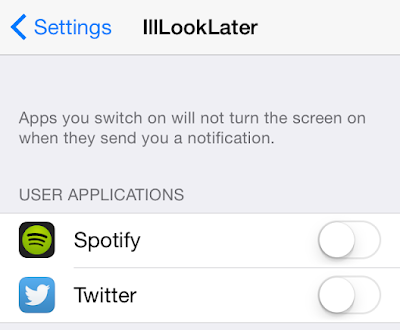
Do you find that many of your incoming notifications don’t warrant the awakening of the Lock screen on your iPhone? Perhaps you think that waking up your iPhone every time you receive a notification is a waste of precious battery. If you feel that way, then you may want to look into  IllLookLater , a recent jailbreak tweak that’s available on Cydia’s BigBoss repo free of charge. IllLookLater makes it so that you can limit the amount of apps that wake the Lock screen when receiving a notification. In other words, it lets you pick and choose the apps that you deem worthy. The good thing about IllLookLater is that the notification audible alert still sounds, and like normal, your notifications will be waiting on you at the Lock screen. The big difference is that you can specify which apps have privileges to wake the screen. After installing the tweak, venture over to the stock Settings app, and tap on the IllLookLater section in the...

How to use San Francisco system font on your iPhone or iPad [Jailbreak Tweak]

Image
If you’ve been looking for a new font for your jailbroken device, maybe you should give the new iOS 9 and OS X Yosemite 10.11 font a try. The San Francisco font can be installed on your iPhone/iPad or even your Mac.  Here we’ll be taking a look how to do it on your iPhone/iPad. (Note: All screenshots below are in the “San Francisco” font) Step 1. Download BytaFont 2 from Cydia. Step 2. Add a new repo to your sources: http://dbk1ng.myrepospace.com Step 3. After the repo has been added, search for “San Francisco iOS8″ and install it. It should be around 19.8MB Step 4. To install, just open up BytaFont 2 and tap on “Basic” Step 5. Tap on “San Francisco iOS8″ and it will respring your device. Once it resprings you will have the entire font system wide on your device. That’s all there is to it!

AquaBoard is now available for iOS 8, adds water effects to your iPhone’s Home and Lock screen

Image
During the days of iOS 7, popular jailbreak developer Elias Limneos released an amazing tweak going by the name AquaBoard. As the name implies, the tweak adds amazing water effects to the Lock screen and the Home screen. When you touch the wallpaper, icons, the lock screen, it creates the ripple effect on the SpringBoard. It feels as if your iPhone’s Home screen and Lock screen are covered with water. It was pretty cool. The good news is that the developer has now updated the tweak to support iOS 8 devices. The ripple effects will appear on top of your current wallpaper and will be formed as soon as you touch the screen. It feels as if your iPhone’s Home screen and Lock screen are covered with water. You can choose from 10 different interestingly named animations such as Turbulence, Aqua Sphere, Waves, Shockwave, Unseen Absyss, Abstract Artist, Heavy Taps and Smudge Brush. Once you install AquaBoard, you can configure it from ...

Apple Watch hacked to run a web browser

Image
Nicholas Allegra a.k.a  Comex  seems to have hacked Apple Watch. He has published a video which shows a web browser running on Apple Watch. Comex is a well-known hacker, and developer of jailbreak tools such as JailbreakMe and Spirit, which were the easiest jailbreaks ever to be released, as it allowed users to jailbreak their iPhone using mobile Safari. The Apple Watch doesn’t come pre-installed with Safari. As you can see in the video, he has managed to hack Apple Watch to load Google’s homepage in a web browser. He also taps and holds on the screen to access the familiar Copy/Define options. It is not possible to search as a QWERTY keyboard is not available for Apple Watch. Navigating across the webpage on the small screen doesn’t look very practical. Apple Watch runs Watch OS, which is a version of iOS 8.2, with a custom UI called Carousel instead of SpringBoard. SpringBoard is the standard application that manages th...

Best Cydia Tweaks of the Week from may 4 to May 10

Image
It’s the time of the week to start taking a look back at what tweaks were released this past week. So let’s take a look at 5 pretty nice, and mostly free, tweaks worth checking out. Combination Lock – Free Combination Lock gives you a different way to unlock your device. When you swipe over form the lock screen you’ll noticed a new dial that would allow you o enter your passcode in a combination lock kind of style. When you get to the next digit in your passcode, change directions to the next digit and continue to do so until your device is unlocked. CCSwipe – Free This is a tweak that will allow you to change what happens when you swipe up from the bottom on your screen in different locations along the bottom. So for instance if you swipe up from the bottom of the screen on the left, it would open the app switcher, the middle would open control center, and the right would either go to the home screen, or if you’re already on the home screen it would lock device. QuartzS...

How to Root HTC Sensation : Step by Step

Image
Hai HTC lovers, The following article shows you step by step method of how to root your HTC Sensation H-boot 1.27.000  without S-Off. Don't forget to take a back up of your phone before proceed. So let's begin Requirements: 1. Download the  HTC One X All-In-One Toolkit V1.0  from this  link , Thanks Mr. hasoon2000   2. Download the latest  CMW recovery  , choose the latest for Pyramid (The Sensation) in *.img. Here is the  CMW 5.8.0.9 link . 3. Download  SuperSU 0.88.zip , thanks Mr. Chainfire  or from this link  [23.04.2012] SuperSU v0.88 . Step By Step Method: 1. Copy the SupperSU.zip file to your SD root. 2. Extract the HTC One X All-In-One Toolkit V1.0 to the Disktop. 3. Connect your Mobile and make sure you're in the charging mood and your check USB development or debugging option. 4. Run the One X.exe application. 5. Install the HTC drivers. ****If you unlocked your Sensation's bootloader from HTCdev.com then skip s...